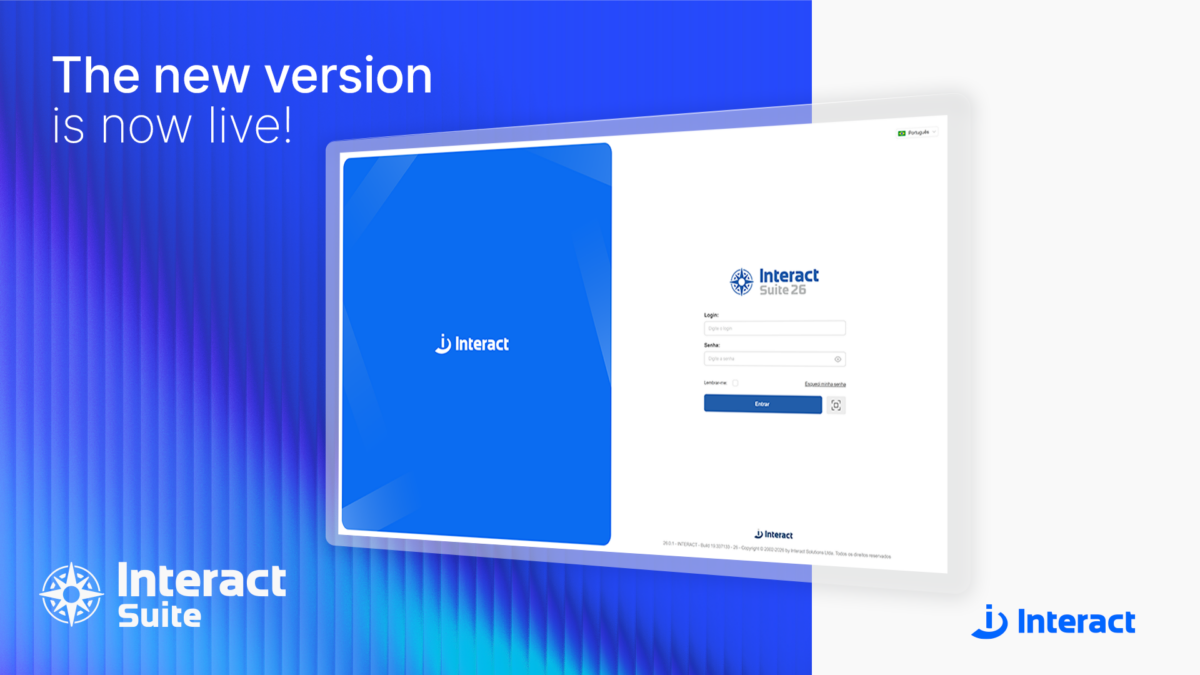
Today, April 28, 2026, Interact launches a new version of Interact Suite 26. This release is considered a milestone for the company, marking a new phase in the product’s evolution—a true generational shift.
To celebrate this moment, an exclusive webinar was held last Friday (April 24) for Interact’s clients, business units, and partners, with the purpose of sharing the product’s latest updates firsthand.
Every two years, the software undergoes a major update, including necessary architectural enhancements, with the goal of delivering even greater technology and security.
“Security is a fundamental pillar for Interact. In addition to having an internal team dedicated to testing, we also rely on an external company that performs complementary routines to ensure even greater credibility and security for our clients,” highlights Lucas Bellin, Interact’s Chief Technology Officer.
The changes go far beyond a simple visual upgrade. The new version introduces new components, artificial intelligence features, revised standards, and a reorganized interface designed to deliver a more modern, consistent, and intuitive experience.
The release also includes changes to names and terminology, which have been updated to strengthen the brand and create a cohesive identity across all Interact products and solutions.
Naming Changes
From now on, the product adopts the name “Interact Suite,” without the “SA,” to reflect the company’s current stage and mark a new phase in its evolution.
Other terminology has also been updated: modules are now referred to as core solutions, and solutions are categorized as methodological solutions and integrated solutions.
To simplify the naming structure, the terms “Manager” and “SA” have been removed. For example, “SA Governance Manager” is now called “Interact Governance.”
Key Usability Improvements
The changes are noticeable from the login screen, as the system now features a new identity that is cleaner and aligned with design best practices.
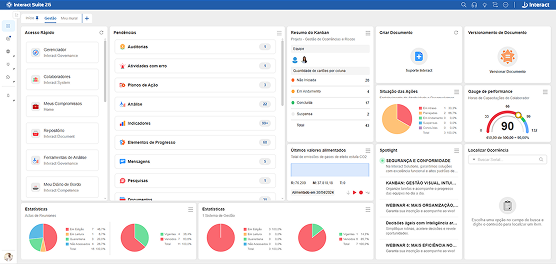
The Dashboard, introduced in version 10, gains even more prominence by allowing it to be pinned to the home screen, enabling centralized and easier access to items that are part of users’ daily routines.
The feature offers more than 60 card options, available according to the contracted solutions, and supports up to 10 different tabs to accommodate various perspectives and workflow needs.
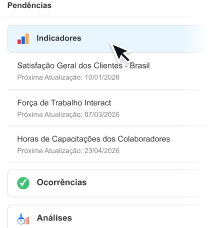
Pending items have also undergone interface improvements, making it easier to track everything that requires closer attention.
As a result, the “My Agenda” feature has been redesigned to incorporate icons, titles, and item counters, facilitating the identification of and navigation across different categories of pending items.
Additionally, the experience has been optimized across main menus, headers, shortcuts, lists, editors, and other interface elements.
New Features of Interact Suite 26
Interact Governance
• OKR Methodology
Interact Governance now provides native support for the OKR methodology. Users can create and manage OKRs directly within the strategic framework, with dedicated visual identity, terminology, and fields, while maintaining the robustness and behavior already established in Action Plans.
• Governance Assistant
The Governance Assistant will offer three distinct AI-powered use cases: strategic review, new indicators, and new action plans.
With it, users will be able to:
– Review strategies with the identification of risks, opportunities, and governance recommendations;
– Expand analysis by operating across all levels of the model;
– Generate suggestions for new indicators based on existing data;
– Receive recommendations for actions within Action Plans and Key Results (KRs) for OKRs;
– Accelerate the review and continuous improvement process with data-driven support, among other capabilities.
Interact Project
• Agile Projects
Interact Project now offers built-in capabilities for managing agile projects, featuring a simplified lifecycle.
Interact Process
• Process Mining
Interact introduces a new feature that represents a significant step forward in the evolution of process modeling within the product.
Now, it’s possible to automatically generate a process model based on real execution data. In other words, users no longer need to start from scratch and can instead work from an existing structure.
Interact Document
• Document Creation
To meet a recurring client demand, Interact Document now includes document creation integrated with Microsoft 365.
This feature enables users to create and edit documents directly using the Word, Excel, and PowerPoint editors, leveraging the full capabilities of these tools.
• Document Assistant
In this new version, Interact Document now features an AI-powered Assistant that allows users to ask questions about document content and receive fast, contextualized answers.
The results provided by the Assistant are context-based. Each context is defined through a document filter configured by the users themselves.
Additionally, document review is now available among the AI functionalities, considering aspects such as clarity and objectivity of the text, inconsistencies and contradictions, as well as spelling and grammatical corrections.
Interact Risk
• Risk Management Assistant
Interact Risk now also leverages AI support through Assistants that analyze the risk structure of a business unit and help enrich it with new suggestions.
This functionality can support the process by suggesting risks for a given category, controls and factors for already identified risks, as well as treatment actions for risks or controls.
Interact Occurrence
• Incident Assistant
With the support of the Incident Assistant, users can explore records in a simple and conversational way, asking questions and obtaining quick answers based on the entire history.
This functionality enables intelligent interaction with the incident history, facilitating queries, supporting analyses, and helping transform records into valuable insights for daily operations.
Its operation is similar to the Document Assistant, using as a basis the information contained within the incidents themselves.
The new version of Interact Suite is now available for purchase. Contact us to request a demonstration.
Existing Interact clients who wish to request the update can get in touch with the Customer Support team.